Settlement with Service
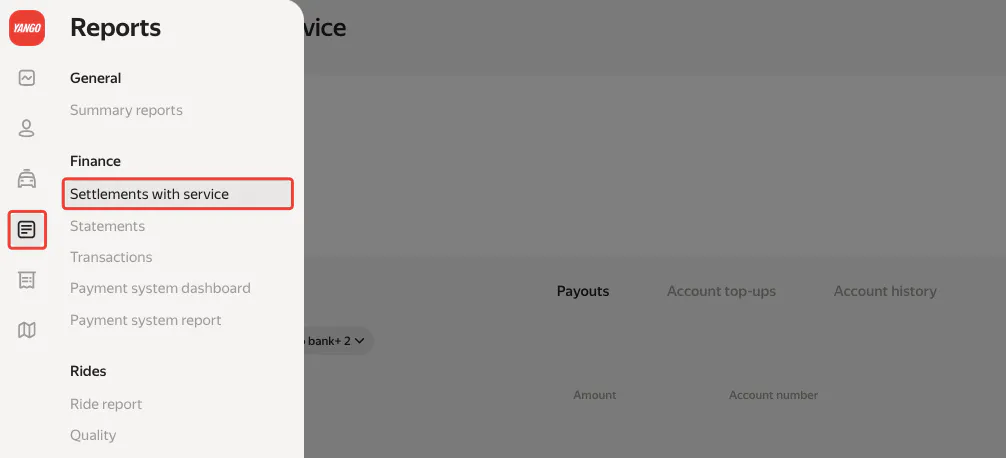
All your business financial information is centralized in the «Reports – Finance – Settlement with Service » section of Fleetroom. Here, partners can access comprehensive financial data for every service they are connected to—including ride-hailing (taxi), delivery, and more.
INTRODUCTION TO FINANCIAL DASHBOARD
All your business financial information is centralized in the «Reports – Finance –Settlement with Service » section of Fleetroom. Here, partners can access comprehensive financial data for every service they are connected to—including ride-hailing (taxi), delivery, and more.
This section is designed to provide clear visibility into your financial interactions with Yango, ensuring transparency and control over your business’s cash flow.
SERVICE ACCOUNTS
Within the ride-hail account section, you’ll find essential details:
- Balance: Shows your current available funds.
- Limit: The minimum required balance to operate without restrictions.
If your balance falls below the set limit, you must top-up your account promptly. Yango deducts its commission directly from this balance. If you do not maintain the required minimum, your drivers may be restricted from receiving cash orders. In cash-only markets, this could mean all drivers lose access to orders, resulting in lost revenue.
Key Points:
- Always keep your balance above the limit to avoid service interruptions.
- Each service account (e.g., ride-hail, delivery) is managed independently and may have different minimum requirements.

CORE FINANCIAL MANAGEMENT SECTIONS
Three critical subsections help you manage your finances effectively:
- Payouts
- Account Top-ups
- Account History
Each plays a unique role in your financial management workflow.

Payouts
This section provides a detailed overview of your earnings and Payouts:

-
Amount Available for Payout: This is the accumulated earnings for future payment. It is displayed in United States Dollars (USD). However, for corporate contracts, local currency balances are also shown.
-
Payouts Amount for Selected Period: You can view earnings for any chosen timeframe.
-
Select the Payouts period you would like to see. It can range from 1 to several days or weeks.
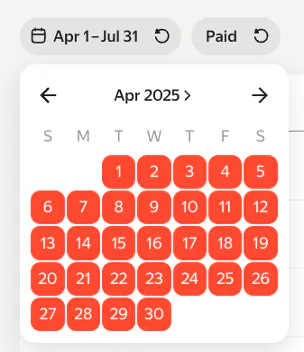
- Customizable Filters: Filter Payouts by period or status (Created, Sent to bank, Paid, Zero Payment, etc.).

PAYOUTS STATUSES EXPLAINED
- Created: Payment order is generated but not yet sent to the bank.
- Sent to Bank: Payment has been sent to Yango’s bank account, awaiting confirmation of transfer to your bank.
- Paid: Bank has confirmed the payment; funds may take a few minutes to several days to reflect.
- Cancel: Payment was canceled before reaching the bank.
- Zero Payment: Represents a mutual offset of commission and bonuses, netting to zero.
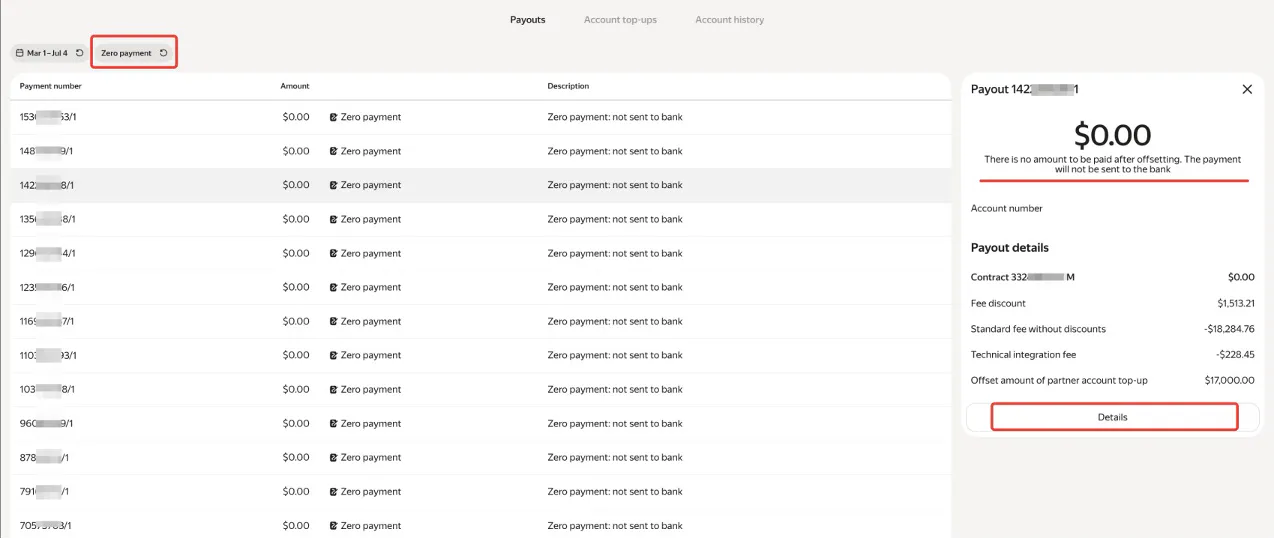
Zero payments are created to transparently show how partner bonuses are used to offset commissions. Partners can review all transactions included in these mutual offsets for full clarity.
PAYMENT & PAYOUTS DETAILS

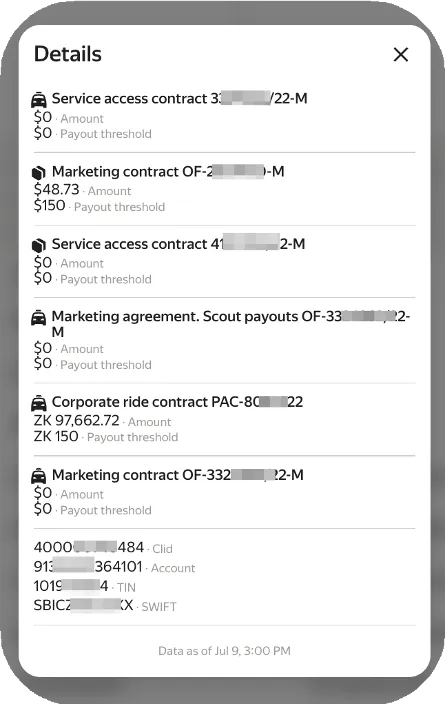
Clicking on «Details» for any Payouts provides:
- Breakdown of Payouts: See detailed information for each contract (taxi, delivery, etc.).
- Bank Information: Access your bank account number, TIN, and SWIFT details.
- Current Balance: View the amount scheduled for future payment.
Important Terms
- Amount: Accumulated balance due for payment (to you)
- Payouts Threshold: This is the minimum amount required to trigger a Payouts. Different countries have different Payouts conditions and rules. In some places, to receive a Payouts under a contract, you need to reach the Payouts threshold—as in this example, where the accumulated amount ($48.73) is less than $150, so the Payouts will not be formed.
- Payouts Schedule: Some countries have fixed payment days (e.g., Mondays and Thursdays), regardless of the Payouts threshold. In that case, you won’t receive payment outside the schedule days.
PAYOUTS HISTORY AND DETAILS
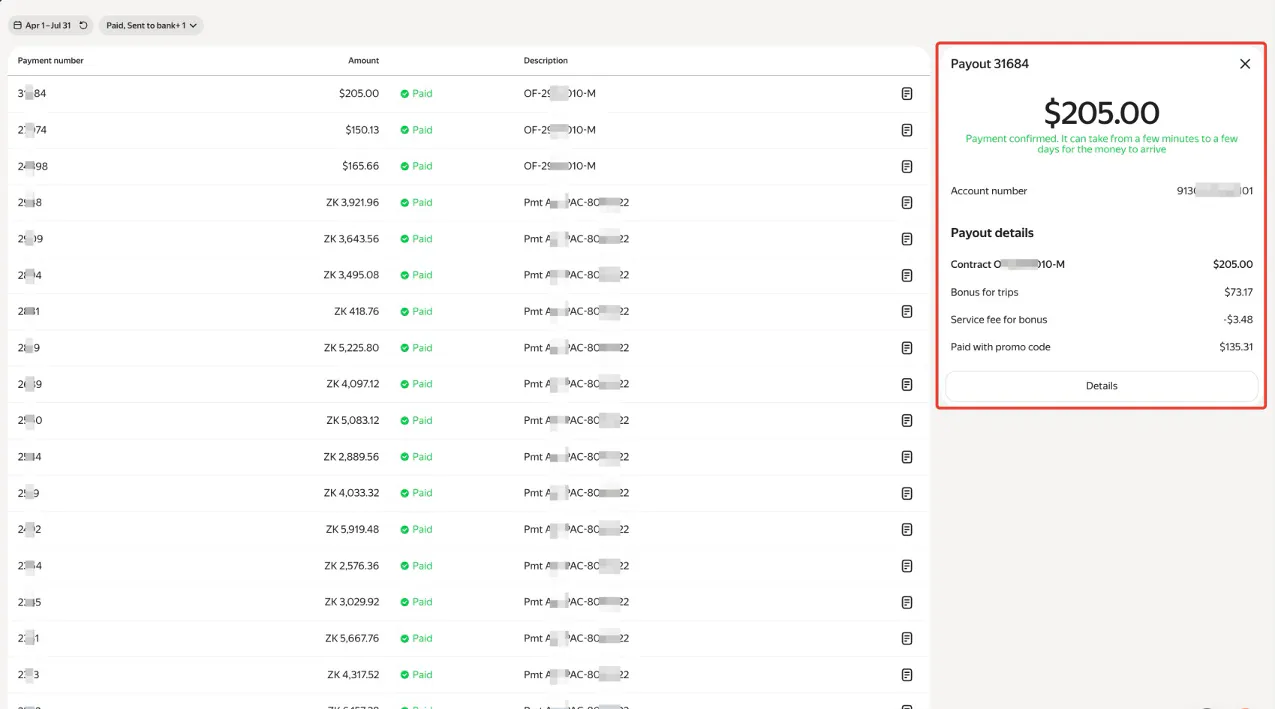
The Payouts history section offers a comprehensive log of all payments made.
Documentation: Each Payout is clearly documented. Payouts Number, Amount, Status, Description, and Date.
Detailed Breakdown: Click on any Payouts to see breakdown such as bonuses, service fees, and promo code amounts.
Download payment Confirmations: Easily download Payouts receipts for your records. At the right-hand side of each Payouts log, you can click on the document icon to download the payment confirmation.
Account top-ups

This section tracks all replenishments and credits to your personal accounts:
- Real-Time Updates: Account balances are updated every hour after mutual offset. Card payments typically reflect within 1–3 minutes.
- Verification: Always confirm that your top-ups appear in your history after making a payment.
- Troubleshooting: If your local bank debits your account but the payment doesn’treflect(commonwithinternational transfers), contact your bank’s support immediately.
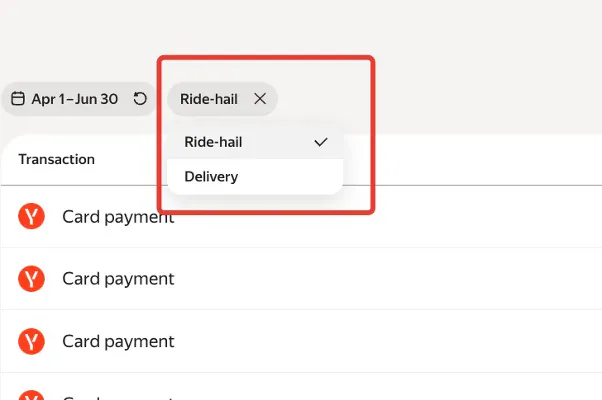
You can switch between different service accounts (e.g., ride-hail, delivery) to view specific top-ups histories.
Account history
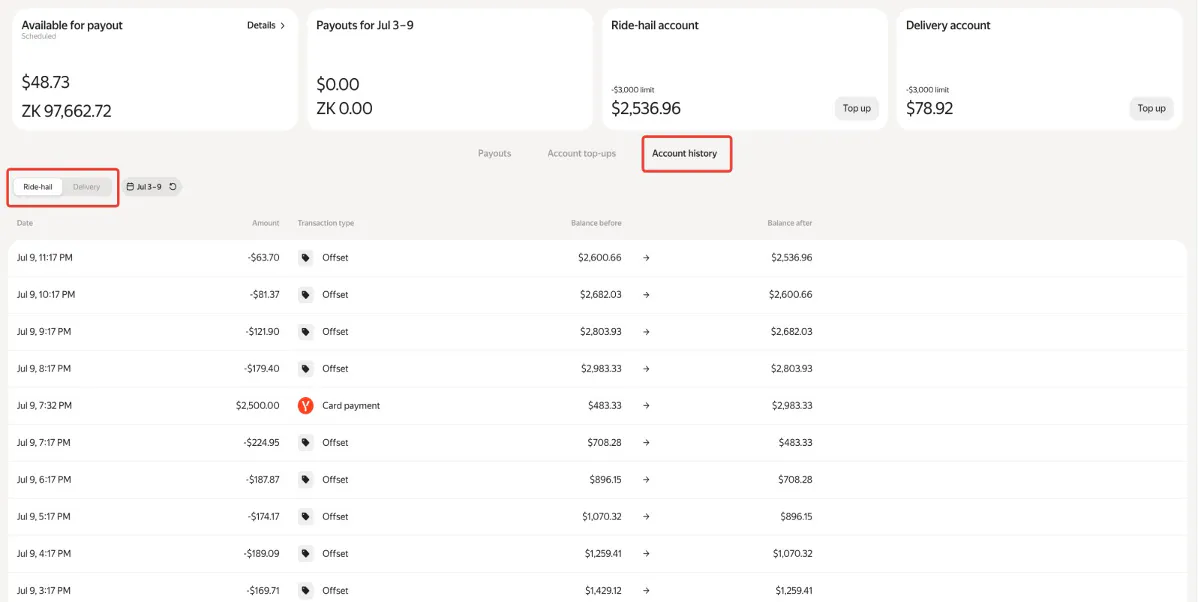
The Account History subsection provides a detailed log of all account activity:
- Hourly Updates: Balances are updated every hour based on mutual offset results.
- Transaction Details: See every debit, credit, and the reason for each change.
- Balance Tracking: Monitor how your balance changes over time, with full access to hourly and minute-by-minute records.
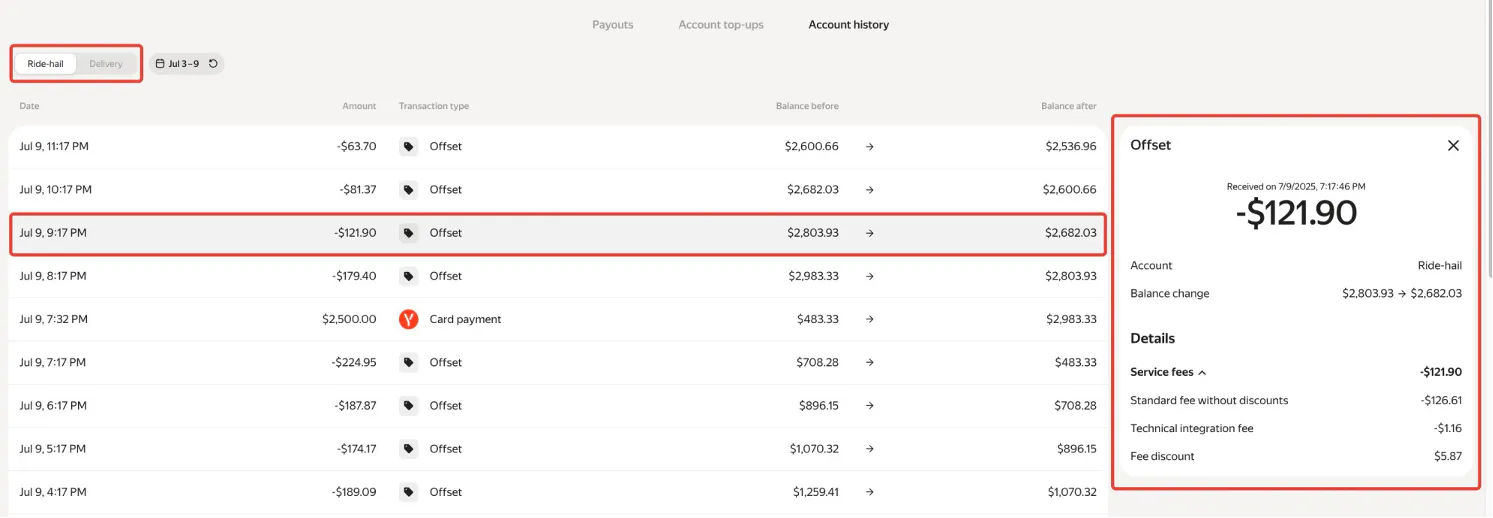
You can access the specifics behind any balance change, such as:
- Service Fee Deductions: See if commissions were charged with or without discounts.
- Technical Integration Fees: Charges for connecting to the payment system.
- Fee Discounts: Reflects where bonuses reduced your commission.
- Note: Account history is only available for the last seven days. Regular monitoring is essential to avoid missing important information.
BEST PRACTICES FOR FINANCIAL MANAGEMENT
- Monitor balances daily to avoid service disruptions.
- Top up accounts promptly when nearing the minimum limit.
- Check Payouts and top-ups histories after every transaction.
- Understand Payouts schedules and thresholds for your contracts.
- Contact your bank immediately if payments do not reflect as expected.
CONCLUSION
Effective financial management in Fleetroom is crucial for uninterrupted operations and maximizing your earnings. By understanding each section of the finance dashboard and following best practices, you can ensure smooth business operations and minimize risks associated with payment delays or account restrictions.
Stay proactive, monitor your accounts regularly, and leverage the available tools for full transparency and control over your finances.